 SpotiBlocker
Mutes the Spotify desktop app while an ad plays, then turns it back on when the music returns. Windows.
Overview
SpotiBlocker runs in the background and watches Spotify. The moment an ad starts it mutes Spotify, plays something you picked instead, and unmutes when the ad ends.
It doesn't block or skip ads. The ad still plays; you just don't hear it. It only ever changes your own volume, so there's nothing for Spotify to object to.
Install
Download SpotiBlocker.exe from the Releases page and run it. That's it.
It starts watching right away and adds itself to startup, so from then on it runs at every login with no window and no taskbar button.
The panel
Press Ctrl Alt A anywhere to show or hide it. Closing the window just hides it again.
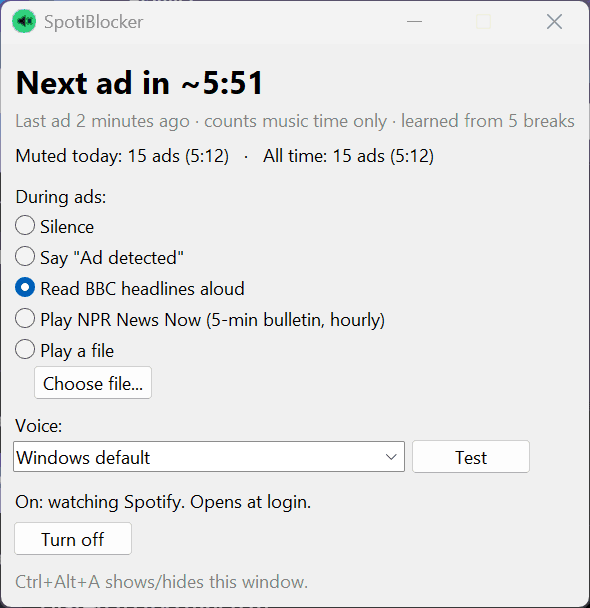
- Next ad in: a countdown to the next ad break, learned from your listening.
- Muted today: how many ads it caught, and how long they ran.
- Turn off: stops watching and removes it from startup.
During ads
Pick one in the panel. The change applies from the next ad.
| Option | What you hear |
|---|---|
| Silence | Nothing. |
| Say "Ad detected" | A short spoken heads-up, in any Windows voice. |
| Read BBC headlines | The latest BBC News headlines, read aloud. |
| NPR News Now | The hourly five-minute bulletin, resuming where the last ad stopped. |
| Play a file | Any mp3, wav, wma or m4a you choose. |
Whatever plays comes out about as loud as your music was.
How it works
Spotting an ad
Two independent checks. Spotify's window title reads Artist - Song for music and the advertiser's name for ads. Windows' media info backs it up: songs come with an album, ads don't.
Matching loudness
It measures what actually comes out of your speakers while music plays, so Spotify's own volume slider counts, then sets the filler to match. What it learns is saved.
The countdown
Spotify schedules ads by listening time, not clock time, so the countdown only moves while music plays and learns your usual gap between breaks.
Build from source
Python 3.11+ on Windows.
pip install -r requirements.txt pyinstaller
build.bat
The exe lands in dist\SpotiBlocker.exe.
Or run it without building:
pythonw app.pyCommand line
Prefer a terminal? ad_suppressor.py does the same job without the panel. It runs until you press Ctrl C, then unmutes Spotify on the way out.
python ad_suppressor.pyWith no options it mutes Spotify and reads BBC headlines during ads. Pick something else with one of these:
| Option | What it does |
|---|---|
--silent | Mute only, play nothing. |
--say-only | Just say "Ad detected". |
--npr | Play the NPR News Now bulletin. |
--play FILE | Play an audio file. |
--voice NAME | Pick a voice, e.g. Mark. |
--list-voices | Show the voices you can use. |
--system | Mute all sound on the PC instead of just Spotify (always silent). |
--install | Open the panel now and at every login. |
--uninstall | Close the panel and remove it from login. |
python ad_suppressor.py --npr
python ad_suppressor.py --say-only --voice Zira
python ad_suppressor.py --play "C:\Music\interlude.mp3"Limits
- Windows only, and only the Spotify desktop app. Not the web player.
- Tracks with no album look like ads, so local files would be muted.
- The countdown is an estimate. Spotify varies its timing a little.
- Loudness matching is rough when Windows volume is very low.
Troubleshooting
Ctrl+Alt+A does nothing: another app has that shortcut. Check spotiblocker.log.
An ad wasn't muted: make sure you're using the desktop app, then check the log for an "Ad detected" line.
Where's my data? Settings, ad history and the log live in %APPDATA%\SpotiBlocker.